Wednesday, 29 August 2012

Fix Microcode Update Error in HP System.

LEARN HOW TO FIX MICROCODE UPDATE ERROR IN HP MODEL dc7100

Download the below file and Just follow the given instructions.

File Size: 2.86 MB approx.
Click Below Link to Download:


Click here to Download Bios/Flash


Step-1: Just double click on downloaded file.

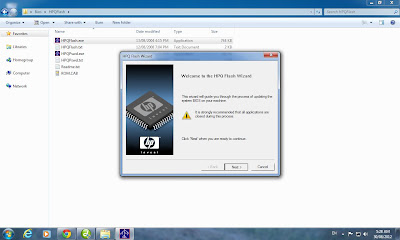
Step-2: Click Next Button as shown on pic.

Step-3: Accept License Agreement & Click Next.

Step-4: Click on Change button to select destination folder.

Step-5: I Recommend to extract it on Desktop by Creating Bios folder.

Step-6: Double Click on Bios folder located at Desktop.

Step-7: Double Click on HPQFlash Folder.

Step-7: Right Click on HPQFlash.exe & Run as Administrator (in Windows 7/Vista),
XP Users just double click on it.

Step-8: Be ready to Flash Bios, close all program & Click on Next.
It will take upto 30~60 seconds to complete, then restart your PC.


Watch my below youtube video tutorial, which will guide you more easily.


That's all you need to perform.
Enjoy....

If having any kind of trouble, then reply...
Don't forget to comment, which are most valuable for me.

Tuesday, 17 July 2012

How to Install Windows XP using USB / Flash Drive / Data Traveller

LEARN HOW TO INSTALL WINDOWS XP WITHOUT CD/DVD/ROM

You have to download below link software for making Windows XP USB...
In this step you will Burn Windows XP setup into your Flash Disk.

File Size: 640 KB                   (Password: "lyari.co.cc")
Click Below Link to Download:


Rapidshare Link:
PeToUSB Software

Hotfile Link:
PeToUSB Software


File Swap Link:
PeToUSB Software


ADrive Link:
PeToUSB Software


File Factory Link:
PeToUSB Software


Watch my below youtube video tutorial
in which I have shown all steps, how to make an USB
for the installation of Windows XP


Minimum USB Drive require = 2GB

After burning the Windows XP setup into USB/Flash Drive, you have to setup boot option for Flash/USB HDD as primary so that your USB starting booting. (Note: some older PCs do not have USB Booting option in their Bios Setup).

How to Install into a PC/Laptop?

Step-1
When your system detect the USB/Flash Drive & start booting, then select first option "1. TXT Mode Setup Windows XP, Never unplug USB-Drive Until After Logon".


Step-2
After first restart of your system & the same screen come again, then now you have to select second option "2. GUI Mode Setup Windows XP, Continue Setup + Start XP" & proceed the setup & install it..


That's all you need to perform.
Enjoy....

If having any kind of trouble, then reply...
Don't forget to comment, which are most valuable for me.

Sunday, 24 June 2012

DLF Indian Premier League Patch (IPL-5) [New Links Updated]

DLF Indian Premier League 5 Patch for EA Cricket 2007 Game
Absolutely Free Downloading...
Patch made by FM Studios

DLF Indian Premier League Season 5

DLF IPL-5 Patch for EA Cricket 2007 Game.


Download the DLF IPL-5 Patch.
Patch File Size: 358 MB approx.

Download Links are below:  Password is "lyari.co.cc"


Rapidshare Links:
DLF IPL-5 Patch Part-1
DLF IPL-5 Patch Part-2
DLF IPL-5 Patch Part-3
DLF IPL-5 Patch Part-4
DLF IPL-5 Patch Part-5
DLF IPL-5 Patch Part-6

Hotfile Links:
DLF IPL-5 Patch Part-1
DLF IPL-5 Patch Part-2
DLF IPL-5 Patch Part-3
DLF IPL-5 Patch Part-4
DLF IPL-5 Patch Part-5
DLF IPL-5 Patch Part-6


File Swap Links:
DLF IPL-5 Patch Part-1
DLF IPL-5 Patch Part-2
DLF IPL-5 Patch Part-3
DLF IPL-5 Patch Part-4
DLF IPL-5 Patch Part-5
DLF IPL-5 Patch Part-6


ADrive Links:
DLF IPL-5 Patch Part-1
DLF IPL-5 Patch Part-2
DLF IPL-5 Patch Part-3
DLF IPL-5 Patch Part-4
DLF IPL-5 Patch Part-5
DLF IPL-5 Patch Part-6


File Factory Links:
DLF IPL-5 Patch Part-1
DLF IPL-5 Patch Part-2
DLF IPL-5 Patch Part-3
DLF IPL-5 Patch Part-4
DLF IPL-5 Patch Part-5
DLF IPL-5 Patch Part-6


After Downloading the all above links..
Just right click on any downloaded file and click on extract.....
Run the setup file "IPL-5.exe" and install it to your Cricket 2007 Root directory.

Then load the Roster "IPL-V" for playing DLF IPL-5 Matches and enjoy it...

Few of users/peoples are facing problem with "Auto quitting game during play or after playing few overs" and "when pressing Esc button from keyboard". If any one having this problem then install "IPL-5 Bug Fixer"available in downloaded folder...


If you don't have EA Cricket 2007 Game installed in your Computer then first Download it.
Click here for Downloading EA Cricket 2007 Game


For more: See below video tutorial, how to install this patch....


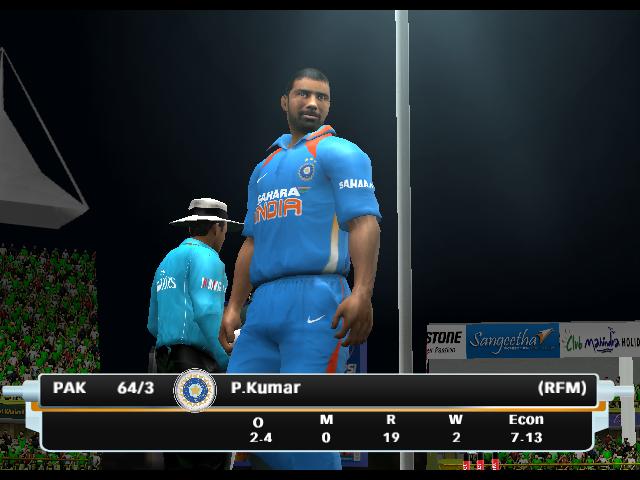
Below Pics are Game-Play Reviews/Actions of DLF IPL-V Patch

Game Play Action-1

Game Play Action-2

Game Play Action-3

Game Play Action-4

Game Play Action-5

Game Play Action-6

Game Play Action-7

Game Play Action-8

Game Play Action-9

Enjoy Playing the DLF IPL-5 Patch for EA Cricket 2007 PC Game......
If need any type of assistance then comments without any hesitation...
Your feedback will be appreciation for us.

Indian Premier League 2012 Patch (DLF IPL-5) (New Links Updated)


DLF Indian Premier League 2012 (IPL-5) Patch for EA Cricket 2007 + Cricket 2012 Patch
Absolutely Free Downloading...
Patch made by A'Unit Studios

DLF Indian Premier League 2012

The is IPL 2012 Patch for EA Cricket 2007 + Cricket 2012 Patch.

Download the DLF IPL-5 Patch.
Patch File Size: 98.9 MB approx.


Download Links are below:  Password is "lyari.co.cc"


Rapidshare Links:
DLF IPL-2012 Patch Part-1
DLF IPL-2012 Patch Part-2

Hotfile Links:
DLF IPL-2012 Patch Part-1
DLF IPL-2012 Patch Part-2


File Swap Links:
DLF IPL-2012 Patch Part-1
DLF IPL-2012 Patch Part-2


ADrive Links:
DLF IPL-2012 Patch Part-1
DLF IPL-2012 Patch Part-2


File Factory Links:
DLF IPL-2012 Patch Part-1
DLF IPL-2012 Patch Part-2


Recommendations for using this patch:
1.You must have install EA Cricket 2007 PC Game.
2.You have to install Cricket 2012 Mega Patch.
(Otherwise this patch will not work)

After Downloading the both above links..
Just right click on any downloaded file and click on extract.....
Run the setup file "IPL-V.exe" and install it to your Cricket 2007 Root directory.

Then load the Roster "U-IPL5" for playing IPL-2012 as well as Cricket 2012 Mega Game Matches and enjoy it...

If you don't have EA Cricket 2007 Game installed in your Computer then first Download it.
Click here for Downloading EA Cricket 2007 Game


If you don't have Cricket 2012 Mega Patch installed in your Computer then first Download it.
Click here for Downloading Cricket 2012 Mega Patch

For more: See below video tutorial, how to install this patch....


Below Pics are Game-Play Reviews/Actions of DLF IPL 2012 Patch

Game Play Action-1

Game Play Action-2

Game Play Action-3

Game Play Action-4

Game Play Action-5

Game Play Action-6

Game Play Action-7

Game Play Action-8

Game Play Action-9

Enjoy Playing the DLF IPL-2012 for EA Cricket 2007 PC Game & Cricket 2012 Patch.
If need any type of assistance then comments without any hesitation...
Your feedback will be appreciation for us.

Wednesday, 20 June 2012

Cricket 2012 Mega Patch (New Links Updated)

Cricket 2012 Mega Patch for EA Cricket 2007 Game
Absolutely Free Downloading...
Patch made by A'Unit Studios

Cricket 2012 (Mega)

The First ever Mega Patch of Cricket 2012 for EA Cricket 2007 Game.

Download the Cricket 2012 Mega Patch.
Patch Setup File Size: 673 MB approx.
Boundary Music Patch Size: 79 MB approx.


Download Links are below:  Password is "lyari.co.cc"

Rapidshare Links:
Cricket 2012 Mega Patch Part-1
Cricket 2012 Mega Patch Part-2
Cricket 2012 Mega Patch Part-3
Cricket 2012 Mega Patch Part-4
Cricket 2012 Mega Patch Part-5
Cricket 2012 Mega Patch Part-6
Boundary Music Patch (Optional)

Hotfile Links:
Cricket 2012 Mega Patch Part-1
Cricket 2012 Mega Patch Part-2
Cricket 2012 Mega Patch Part-3
Cricket 2012 Mega Patch Part-4
Cricket 2012 Mega Patch Part-5
Cricket 2012 Mega Patch Part-6
Boundary Music Patch (Optional)


File Swap Links:
Cricket 2012 Mega Patch Part-1
Cricket 2012 Mega Patch Part-2
Cricket 2012 Mega Patch Part-3
Cricket 2012 Mega Patch Part-4
Cricket 2012 Mega Patch Part-5
Cricket 2012 Mega Patch Part-6
Boundary Music Patch (Optional)


ADrive Links:
Cricket 2012 Mega Patch Part-1
Cricket 2012 Mega Patch Part-2
Cricket 2012 Mega Patch Part-3
Cricket 2012 Mega Patch Part-4
Cricket 2012 Mega Patch Part-5
Cricket 2012 Mega Patch Part-6
Boundary Music Patch (Optional)


File Factory Links:
Cricket 2012 Mega Patch Part-1
Cricket 2012 Mega Patch Part-2
Cricket 2012 Mega Patch Part-3
Cricket 2012 Mega Patch Part-4
Cricket 2012 Mega Patch Part-5
Cricket 2012 Mega Patch Part-6
Boundary Music Patch (Optional)


After Downloading the all above links..
How to Install this Patch:
1. Double Click on "Cricket12-Patch.exe" file.
2. Browse the root directory of your "EA SPORTS(TM) Cricket 07".
3. Install the patch.
How to play:
1. Double click on "Play Cricket 2012" found in your desktop after installation of Patch.It will ask "Select the directory where you have installed Cricket 07", Just browse the directory once & Enjoy Playing.
2. Go to MY SETTINGS-->>LOAD/SAVE-->>LOAD-->> & PRESS SHIFT key three times from your keyboard & you will see the Roster, click on "Cricket" Roster to load.
3.After Loading Cricket Roster then you will able to play any game, Like Commonwealth Bank Serires, Ashes Series & all the features with upgraded/updated.


If you don't have EA Cricket 2007 Game installed in your Computer then first Download it.
Click here for Downloading EA Cricket 2007 Game

For more: See below video tutorial, how to install this patch....


Below Pics are Game-Play Reviews/Actions of Cricket 2012 Mega Patch Game

Game Play Action-1

Game Play Action-2

Game Play Action-3


Game Play Action-4

Game Play Action-5

Game Play Action-6

Game Play Action-7

Game Play Action-8

Game Play Action-9

Enjoy Playing the First Ever Cricket 2012 Patch for EA Cricket 2007 PC Game......
If need any type of assistance then comments without any hesitation...
Your feedback will be appreciation for us.

Tuesday, 19 June 2012

Cricket World Cup 2011 Patch (New Links Updated)

ICC World Cup 2011 Patch for EA Cricket 2007 Game
Absolutely Free Downloading...
Patch made by A2 Studios

Download the ICC World Cup 2011 Patch.
Patch File Size: 89.8 MB approx.

Download Link is below: Password is "lyari.co.cc"
Single File:

Rapidshare Link:
ICC World Cup 2011 Patch

Hotfile Link:
ICC World Cup 2011 Patch


After Downloading the above link..
Just right click on downloaded file and click on extract.....
Run the setup file "ICC-WC11-Patch.exe" and install it to your Cricket 2007 Root directory.
Then load the Roster WC2011 for playing ICC World Cup 2011 Matches and enjoy it...

If you don't have EA Cricket 2007 Game installed in your Computer then first Download it.
Click here for Downloading EA Cricket 2007 Game

For more: See below video tutorial, how to install this patch....


Below Pics are Game-Play Reviews of ICC World Cup 2011 Game

Game Play Preview-1

Game Play Preview-2

Game Play Preview-3

Game Play Preview-4

Game Play Preview-5

Game Play Preview-6

Game Play Preview-7

Enjoy Playing the ICC World Cup 2011 Game......
If need any type of assistance then comments without any hesitation...
Your feedback will be appreciation for us.

Monday, 18 June 2012

Arclab Water Mark Studio


Download Arclab Water Mark Studio Software Free.
Enjoy Full version Free..


File Size: ~3.65 MB      
(Password: "lyari.co.cc") 
Click Below Link to Download


Rapidshare Link:
Arclab Water Mark Software

Hotfile Link:
Arclab Water Mark Software


File Swap Link:
Arclab Water Mark Software

ADrive Link:
Arclab Water Mark Software

File Factory Link:
Arclab Water Mark Software


Watch this below video tutorial, which let you know how to install this software:


The below video is Tutorial of this software & will guide you, how to make banner or intro using this software. Watch Now!


Please comments, your feedback will be great appreciation for me.